Tag Your Tests: Object/Action FTW
Sometimes the simplest additions make the biggest difference. While working on test specifications, I realized that many test cases describe what happens, but not where it happens. To fix that, I started adding a small column - or a quick tag - that turned out to be a subtle but powerful way to bring structure and instant clarity to my test documentation.
I’m the author of test specifications for a few products, one of which I’m continuously maintaining, and I’m currently designing another one for a product still in development. During both designing and maintaining, I faced a challenge that might seem trivial at first… until it starts to get on your nerves. You might find yourself in this situation too, so lean in and try to visualize it.
You’re scrolling through a test specification, trying to figure out which test cases refer to CRUD processes of a user. You have to read the title of every single test case, so you’d better hope the titles are short and self-explanatory. Even then, it’s hard to distinguish the exact purpose of each test case, and imagine doing that over and over again when time is tight and focus is fading. It gets annoying, you know it. So why not make it easier to quickly tell test cases apart?
I present to you: The Object/Action!
Wait, what? The Object/Action, and it’s so simple and efficient that you might even chuckle when you see how obvious it is. Let me explain it a bit more, this time without exaggeration. The idea is to describe what object the test case is working on and what action is being performed. Two words are enough to define it.
Here are a few examples with test case descriptions:
- Test case goes through the creation of a new user -> the object/action will be
User / Create. - Test case goes through editing an existing user -> the object/action will be
User / Edit. - Test case goes through validations for creating a new user -> the object/action will be
User / Validations.
Keep in mind that you don’t have to limit yourself to just one column or field in the test specification for this purpose. This is simply how I use it, so consider it a starting point for your own approach.
In the following image, you can see an example of Object/Action use. Note that this isn’t a real scenario test specification, but just a quick example I drafted for this article:
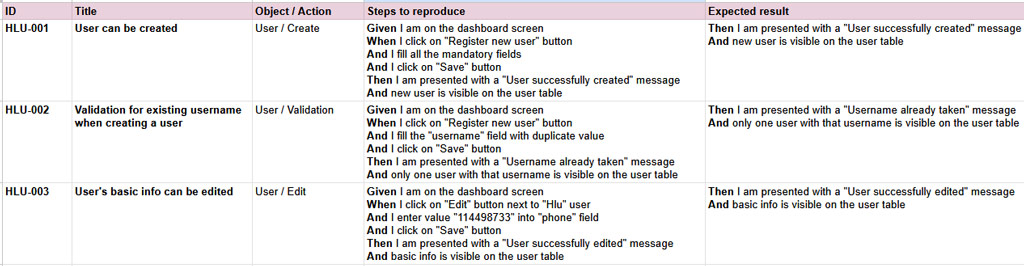
I hope you can see how simple and effective this can be. A quick scroll through your test specification in Excel or TestRail instantly tells you which action each test case performs on which object. This method is especially useful for regression tests, which are often large and complex by nature.
Personally, I add an extra column named Action / Object, and for each test case I define it as shown in the examples above. Whether you use Excel to manage your test specs or a dedicated tool like TestRail, both support adding custom fields or columns, so no unpleasant surprises there.
Of course, this isn’t protected by any license or contract, so feel free to adapt it to your own taste. This is just my idea shared with you and if it made your tests easier to navigate or inspired you to build upon it - I’m more than happy :)